 By Azeez Ope Quadri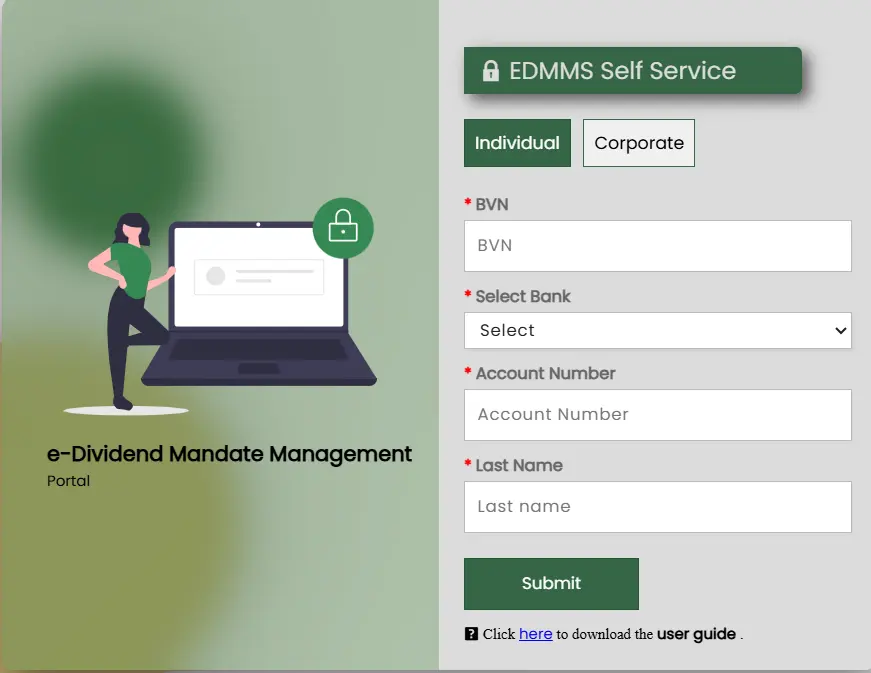
The essence of the eDividend platform by Nigeria’s Securities and Exchange Commission (SEC) is to simplify and remove bottlenecks in tracking and claiming dividends. The process now enables shareholders to receive their dividends electronically. No queues. No long waits.
Note: This guide is written purposefully to serve those whose shares are managed by Coronation Registrars Limited, the registrar for MTN Nigeria. Please know that every company has its assigned registrar. We urge you to change the search terms to suit your specific purpose.
What does the data say about unclaimed dividends in Nigeria?
- Unclaimed dividends in 2019: N158.4 billion
- Unclaimed dividends rose to N190 billion in 2023
- By the end of 2025, unclaimed dividends in Nigeria stood at N242 billion according to SEC data
Why do we have such staggering abandoned dividends?
There are people who bought shares but are now deceased, and most of them didn’t tell any of their relatives about these investments. There are also politicians and civil servants who bought shares using the names of relatives through questionable means; because they don’t want the authorities to investigate them, they abandon them.
Similarly, there are people who bought stocks but don’t have the details of the company they invested in, or the company has been acquired or merged with another company. These people simply don’t know who to talk to.
Claiming your dividends electronically
Some time ago, a man shared a story of how his family tracked and claimed the dividends that their deceased relative left behind without telling anyone. That’s one of the benefits technology has brought to investing.
It has removed tiring physical form-filling and long queues at banking halls. It has also eliminated the need to travel from your location just to claim a dividend.
So, if you bought shares a long time ago, suspect that your parents may have bought shares without letting you know before their passing, or want to track the ones you bought years back, here is the step-by-step guide on how to claim abandoned dividends through the SEC portal:
Step 1: Go to the SEC portal at https://eportal.sec.gov.ng/non-mandated/
Step 2: Enter the name of the company where you bought shares in the space marked “search shareholder or company” and choose the registrar of the company. If you can’t remember the name of the registrar, check below to see the guide on how to search for your registrar.
Step 3: If you find your name in the search results, click on the link next to it. If not, go to https://sec.gov.ng/about/resources/forms/download-e-dividend-forms/ to download the e-dividend form.
Step 4: If you can’t find your registrar’s e-dividend mandate forms on the SEC portal (though they should be there), proceed to step 5 below.
Step 5: Assuming the company you have shares with is MTN, you can search for “who is the registrar of MTN Nigeria” on Google. Click on the result if it is exactly what you are looking for. Now that you know MTN Nigeria’s registrar is Coronation Registrars Limited, use the same Google Search with the terms: “Download e-Dividend Forms for Coronation Registrars Limited.”
Step 6: If it doesn’t come up, use the Coronation Registrars e-dividend portal directly at: https://coronationregistrars.cloud.processmaker.net/webentry/e-dividend-mandate-request
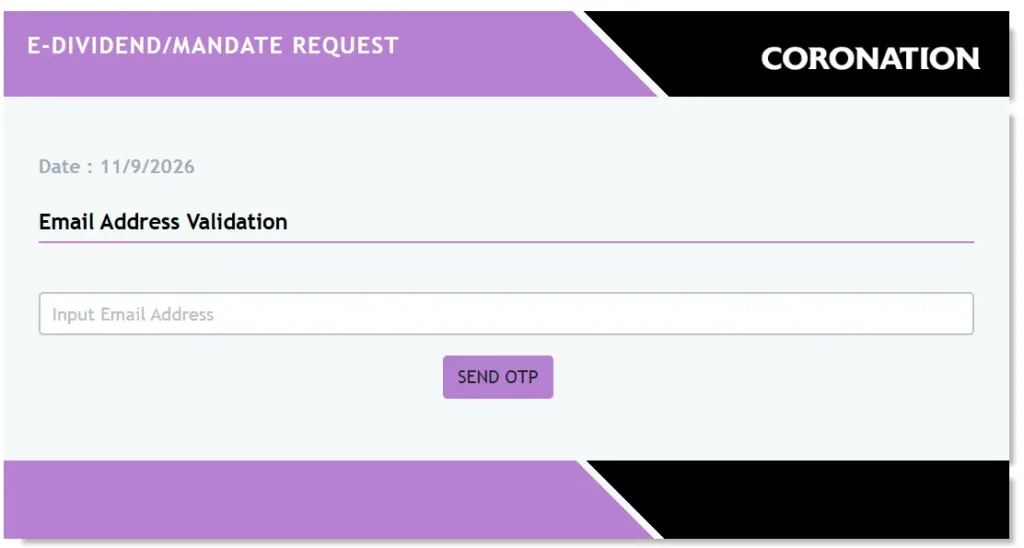
Step 7: On the Coronation E-DIVIDEND/MANDATE REQUEST portal, enter a valid email address to receive an OTP. Enter the OTP and validate it.
Step 8: Enter your details, such as your BVN and other required information, to proceed with completing the form.
When all these processes are completed, you will start receiving your dividends electronically as a “bank alert” whenever the company you invested in makes a profit.
NOTE: Dividends are not automatic. You will only receive a portion of the profit if the company performed well in a trading year. If not, you will not receive anything.
Requirements you will need to complete the process
- Your Bank Verification Number (BVN)
- The Bank name where you want your dividend to be paid
- Account number
- Your Full name
- Phone number
- Email address to receive updates
- Residential address
- A valid Means of identification
What if my registrar doesn’t exist anymore?
If you saw your name – or a lost relative’s name – on the SEC’s eDividend portal but are not sure of the registrar because they closed shop or were acquired by another company, it means you need to begin a fresh search process. Here is how to do it:
Step 1: First, search for the name of the original registrar that sold the shares. If nothing appears on Google search, use search terms such as: “Which company acquired ‘Info Asset Managers’?” (Use the real name of the registrar in place of “Info”).
Step 2: You will see a lot of results. Don’t rely blindly on AI-generated summaries; scroll down to check if the information confirms that another company has taken over.
Step 3: Repeat step 1 if there is no direct link to the new registrar’s name. Don’t stop until you land on the right page.
Still can’t find it? Let us know the challenges you are facing in the comments below. Alternatively, reach out to a certified stockbroker for professional assistance